Quick answer
Autopilot Simulator copies the idea of Tesla Autopilot / FSD inside Roblox. The developer group description, fetched October 23, 2026, still names lane change, traffic light detection, intersection automatic turn, summon, auto park, AEB, light show, and music. Creator videos add on-screen behavior. Those videos were not re-shot after the experience's Roblox updated time of September 25, 2026. Re-check the in-game Autopilot settings and the Store before you buy a pass.
Where the list comes from
Plaid Studio's group description, fetched from the public group API on October 23, 2026, says:
You can experience a variety of functions such as lane change function, traffic light detection function, intersection automatic turn function, summon function, auto park function, AEB function, light show function, music function, etc.
The same description's update history says:
-- Traffic lights added. -- Added light show function. Please enjoy it from the toy box. -- Added advanced UI.
That text names features. It does not document detection distance, reliability, or which items are free. The Roblox games API listed the experience updated time as September 25, 2026 when fetched on October 23, 2026. Creator footage cited below is older than that stamp, so treat button-level behavior as dated.
Feature table
| Feature | What the sources support | Evidence |
|---|---|---|
| Lane change | Named in the group description | Group API, 2026-10-23. Lane-change behavior was not re-tested after the 2026-09-25 experience update. |
| Traffic light detection | Named. Update history says "Traffic lights added." | Group API, 2026-10-23. Erepma's March 11, 2025 video shows an on-screen "Detect Intersection — AutoTurn Available" prompt near a signaled intersection. That clip was not re-shot on the current build. |
| Intersection automatic turn | Named in the group description | Same on-screen prompt in that March 11, 2025 footage. |
| Summon | Named as "summon function" | Group API, 2026-10-23. Phone-menu labels, including "Smart Summon (Beta)" on an official screenshot, are on Controls. Those labels are not in the group description text. |
| Auto park | Named in the group description | Group API, 2026-10-23. Reliability numbers are not published. |
| AEB (Automatic Emergency Braking) | Named as "AEB function" | Group API, 2026-10-23. A Short titled "Testing the new AEB V3" is the basis for reading the feature as a later revision. The March 11, 2025 video caption says Autopilot almost ran into an object. Detection distance is Unconfirmed. |
| Light show | Update history: added, and opened from the toy box | Group API, 2026-10-23. Robipedia lists a badge named "You've started the light show!" and displayed 687,770 awards on the October 23, 2026 fetch. The same page says Data Updated February 28, 2026, so that total is tracker data, not a fresh official count. |
| Music | Named as "music function" | Group API, 2026-10-23. Exact controls are not in that description. |
Settings toggles seen on video, not in the group blurb
The Autopilot settings menu in the "AEB V3" Short shows toggles that the October 23, 2026 group description does not name. Those labels were on screen in that clip. The in-game effect is Unconfirmed unless the table says otherwise. The Short was not dated in the title and was not rechecked after September 25, 2026. Controls records the same menu.
| Toggle | Real-world Tesla analogue (flavor only) | In-game effect verified here? |
|---|---|---|
| Sentry Mode | Parked monitoring | No. Toggle only. |
| Regenerative Brake | Regen braking | No. Toggle only. |
| Auto Speed Limit | Cap to the posted limit | No. Not demonstrated in the clip. |
| Parking Sensor | Proximity while parking | No. Toggle only. |
| Auto Light | Automatic exterior lights | No. Toggle only. |
| Fold Mirrors | Fold the mirrors | No. Toggle only. |
| Camera - Auto | Automatic camera | No. Toggle only. |
| FSD Visualization | Path preview on the driver display | The blue path is described below from creator footage and official promo media. The toggle's current default is Unconfirmed. |
| Drive Speed | — | No. Effect Unconfirmed. |
| Display Size | — | No. Effect Unconfirmed. |
| Key | — | No. The label was on screen and its function was not shown. |
How to engage Autopilot / FSD
Exact labels can move. The experience updated time is September 25, 2026. Use this as a checklist against the live UI.
- Enter a vehicle in Autopilot Simulator / FSD.
- Open the Autopilot / FSD settings. That menu family is the one shown in the AEB V3 Short.
- Enable only toggles that are actually on your screen.
- In Erepma's March 11, 2025 video the control read "Autopilot / Tap To Start" when off and "Tap To Stop" when on. Those words describe that recording. Use the label your build shows.
- Confirm the blue path on the dashboard touchscreen. If it is missing, Autopilot may be off, or the camera angle may hide the screen.
- In that same March 11, 2025 footage, "Detect Intersection — AutoTurn Available" appeared near a signaled intersection.
- AEB is not a guarantee. The March 11, 2025 caption says Autopilot almost ran into an object. Drop Autopilot before a risky maneuver.
Path visualization
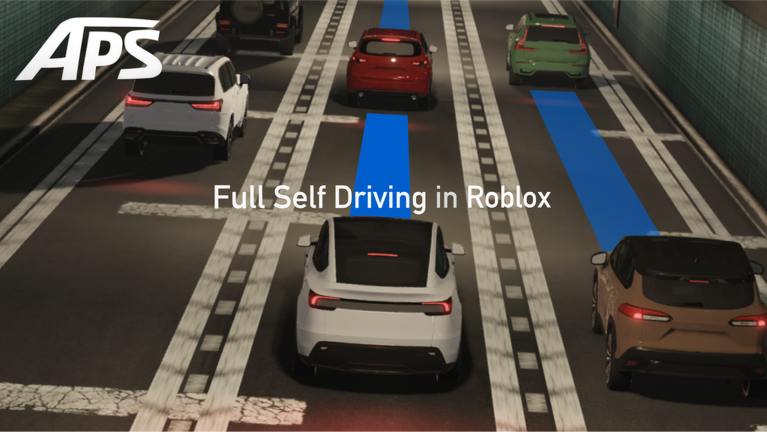
With Autopilot / FSD engaged, the dashboard touchscreen in the cited creator footage overlays a blue lane path ahead of the car. Official promo media also shows this FSD-style path. It is a UI homage, not documentation of a real Tesla. Placement notes are on Controls.
Check the Store before you buy a pass
Two separate facts, neither of which is a current price list:
- Erepma's March 11, 2025 video described testing part of a game pass. That does not prove every Autopilot function is paid in the current build.
- The group description fetched October 23, 2026 says a purchased game pass may take time to apply because of Wi-Fi or a Roblox server error. It does not name a price or which feature the pass unlocks.
Before paying:
- Open the experience Store on Roblox.
- Trigger the specific feature once and read any paywall prompt.
- Buy only what that prompt names. Free tiers and prices are
Unconfirmedon this page.
This is a simulation
Autopilot Simulator is an independent Roblox game by Jun4649s / Plaid Studio. It is not made or endorsed by Tesla, Inc. Nothing here describes real Tesla Autopilot or Full Self-Driving on public roads.
Still unconfirmed
- How far ahead AEB detects a hazard, what triggers a lane change, and how reliable auto-park is.
- Which features are free and which are pass-gated after the September 25, 2026 update.
- Whether every toggle from the AEB V3 settings menu is still in the current build.
- A live official award count for the light-show badge. The 687,770 figure is the number Robipedia displayed on October 23, 2026, next to a February 28, 2026 data-updated field.
Related pages
- Controls
- Codes — no verified code as of October 23, 2026
- Vehicles · Beginner guide